The Jalwa Game app download is quick on both Android and iPhone, and it gives you every game, the Wallet and promotions in one icon. Android users install the app from the official download page, while iPhone users add the site to the Home Screen from Safari.
The app is not listed on Google Play, so the only safe source is the official link on the Jalwa app website. Below are the exact steps for each phone, the two installation options, plus fixes for common install problems.
Quick Answer
- Android: open the download page, choose Quick installation or Complete Installation and allow “install unknown apps” if asked.
- iPhone: open the site in Safari → Share → “Add to Home Screen”.
- Any device: use “Add to Desktop” on the home screen for a one-tap shortcut.
- Not available on Google Play.
- New players can sign up in the app with invite code 4961211804045.
Before You Download
A little preparation avoids most install errors. Check these points before you start.
- A stable Wi-Fi or mobile data connection, so the file downloads fully.
- Some free storage space on your phone.
- Chrome or your usual browser on Android, and Safari on iPhone.
- Your registered phone number or email and password, ready for the first login.
If you do not have an account yet, you can register inside the app after installing it. The invite code 4961211804045 fills in automatically when you sign up through the Register link on this site.
Jalwa Game App Download For Android
Android phones install the app from outside the Play Store. The whole process takes a couple of minutes on most phones.
Android Install Steps
- Open the official Jalwa site in Chrome or your phone browser.
- Tap the download button at the bottom middle of the home page.
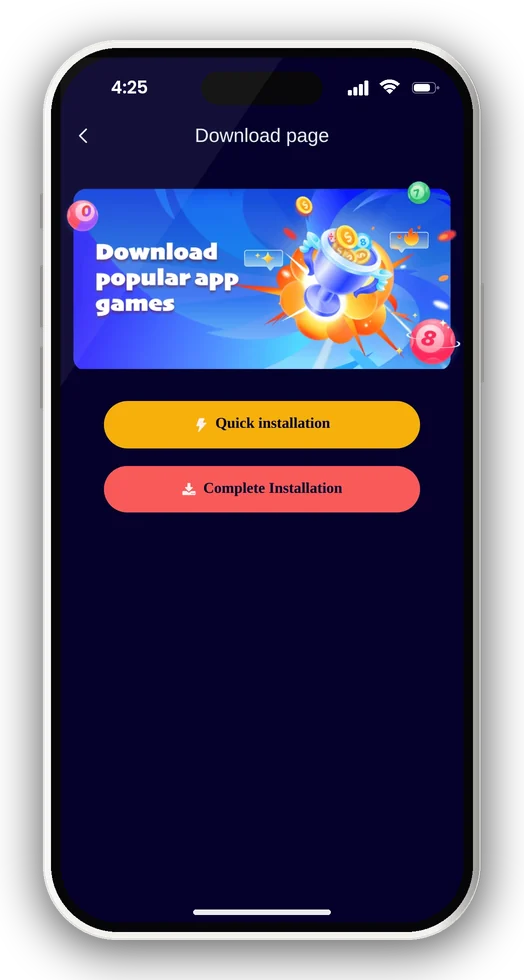
- On the download page, choose Quick installation or Complete Installation.
- If a file downloads, open it from your notifications or the Downloads folder.
- If your phone blocks it, tap Settings and switch on “Allow from this source” for your browser, then tap Install.
- Open the app, then log in or register with your phone number.
Quick Installation Vs Complete Installation
The download page shows two buttons. Quick installation is the faster route to get Jalwa on your phone, while Complete Installation is the fuller install option.
Start with whichever your phone handles best. If one option fails or is blocked, go back and try the other before looking for any third-party file.
Allowing “Install Unknown Apps”
Android blocks apps from outside the Play Store by default. The setting is usually under Settings → Apps → Special app access → Install unknown apps, though the path differs a little by phone brand.
Allow it only for the browser you used to download the file. You can switch it off again once the app is installed.
Adding Jalwa Game To Your iPhone
There is no Android-style install file for iPhone, and the app is not on the App Store. Instead, you save the site to your Home Screen, which gives you an icon that opens Jalwa directly.
- Open Safari and go to the Jalwa Game website.
- Tap the Share button at the bottom of the screen.
- Scroll down and tap “Add to Home Screen”.
- Edit the name if you like, then tap Add.
- Open the new icon and log in.
This method uses Safari, so other browsers may not show the same option. Nothing is installed from outside Apple, which keeps the process simple.
Use “Add To Desktop” For A Shortcut
The Jalwa home screen has its own “Add to Desktop” option. Tap it to place a shortcut on your phone’s home screen or your computer, so Jalwa opens in one tap without typing the address.
This is handy on a laptop or on a phone where you do not want a full install. Your account and balance stay the same whichever way you open Jalwa.
Get the official Jalwa Game app on your phone.
Download AppWhat You Get Inside The App
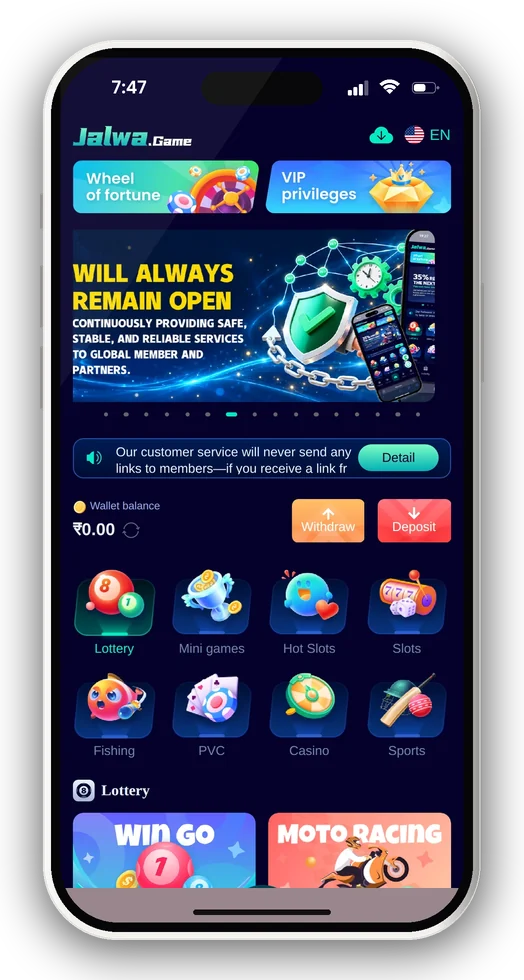
The app has the same layout as the website, with a five-tab menu at the bottom: Promotion, Activity, Home in the centre, Wallet and Account. Each tab leads to a different part of your account.
| Tab | What It Does |
|---|---|
| Promotion | Your invitation link, invite code, team data and commission details |
| Activity | Gifts, Attendance bonus, Betting rebate, Super Jackpot and other events |
| Home | Game tabs: Lottery, Mini games, Hot Slots, Slots, Fishing, PVC, Casino and Sports, plus Wheel of fortune and VIP privileges |
| Wallet | Balance, Main wallet and 3rd party wallet, Deposit and Withdraw |
| Account | History, VIP, Gifts, Settings, Customer Service and Beginner’s Guide |
First Login After Installing
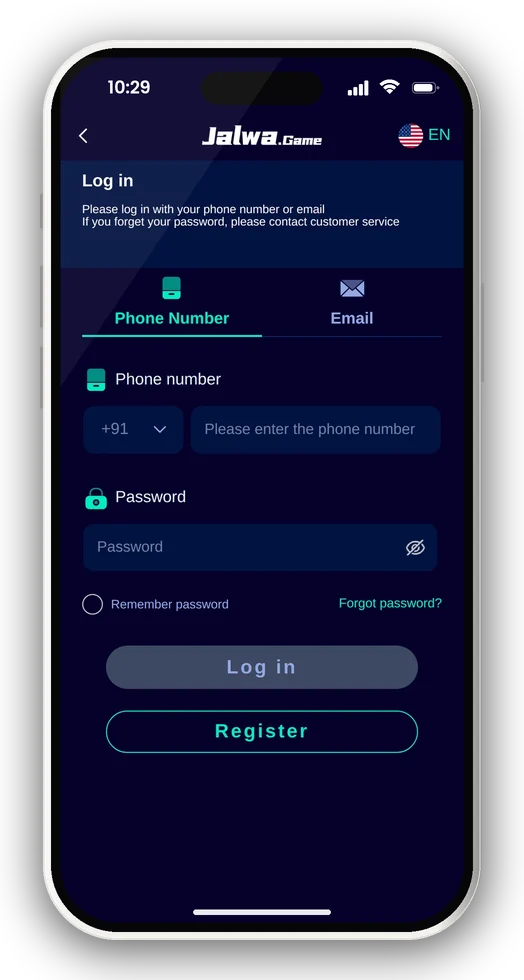
Open the app and enter your phone number or email with your password. Tick “Remember password” so you do not have to type it every time.
If you forget your password, tap “Forgot password?”, enter your registered phone number and a new password twice, then confirm with the OTP sent by SMS. If the OTP does not arrive, contact customer service. Full sign-in help is on the register and login page.
Set Up Your Account In The App
Once you are in, open Account → Settings to check your details and change your login password if needed. The password must have at least 8 characters with upper-case letters, lower-case letters and numbers.
Then visit Beginner’s Guide on the Account page for the platform’s own help notes. Before your first payment, read how to deposit and withdraw on Jalwa, as deposits start from ₹100 on UPI.
App Or Website: Which Should You Use?
Both give you the same games, the same Wallet and the same account. The difference is mostly about convenience.
| Feature | App | Website |
|---|---|---|
| Install needed | Yes (Quick or Complete installation on Android, Home Screen icon on iPhone) | No, or a shortcut via Add to Desktop |
| Games and Wallet | Full access | Full access |
| Login | Stays signed in with “Remember password” | Sign in from the browser |
| Opening speed | One tap from the home screen | Type, bookmark or use the desktop shortcut |
| Best for | Your own phone | Shared or new devices |
If you use one phone every day, the app is the faster choice. The website works well when you want to check your balance on another device.
Download Safety Rules
Fake APK files are the biggest risk with apps that are not on Google Play. A copied app can look the same but steal your password or payment details.
Use Only The Official Link
Download only from the official download page. Jalwa states that its customer service will never send links to members, so a “new app link” from someone claiming to be JALWA.GAME support is a hacking attempt.
Do not install files shared in WhatsApp groups, unknown Telegram channels or random download sites.
Signs Of A Fake APK
- The file comes from a link someone sent you privately.
- It asks for permissions that make no sense, such as contacts or SMS access.
- The login page looks slightly different or asks for your UPI PIN.
- It promises “hacked” results or guaranteed Win Go wins.
Never share your password, OTP or UPI PIN with anyone, even someone claiming to be support. For more on staying safe, read is Jalwa Game legal and safe in India.
Keeping The App Updated
New versions can bring fixes and new games. When the app shows an update message, follow it so you are not stuck on an old build.
How To Update On Android
Open the same official download page and install the latest version over the old one. Your account details stay on the server, so you simply log in again if asked.
iPhone Home Screen Icon
The iPhone icon opens the live website, so it updates on its own. If something looks out of date, close Safari fully and open the icon again.
App Not Opening? Try These Fixes
Most install and opening problems have simple fixes. Try these in order before contacting support.
- “App not installed” error: delete any old version first, then install again.
- Install blocked: turn on “install unknown apps” for your browser.
- One option fails: switch between Quick installation and Complete Installation.
- Download stuck: switch between Wi-Fi and mobile data, then try again.
- Slow loading: the Activity tab promotes installing 1.1.1.1 for a faster experience, which you can try.
- Blank or white screen: clear the app cache in phone Settings and reopen it.
- Still not working: reinstall from the official page or use the website for now.
If none of these help, open the website, go to Account → Customer Service and describe the problem. Support is available around the clock.
App Download FAQs
Is the Jalwa Game app on Google Play?
No, it is not on Google Play. Android users install it from the official download page on the Jalwa site.
Should I pick Quick installation or Complete Installation?
Both are on the official download page. Try the one that suits your phone, and if it fails, use the other.
How do I get the app on iPhone?
Open the site in Safari, tap Share and choose “Add to Home Screen”. The icon then opens Jalwa directly.
Do I need a new account for the app?
No, the same account works on the app and the website. New players can register in the app with invite code 4961211804045.
Why does my phone say the app is harmful?
Android shows this warning for many apps from outside the Play Store. Install only from the official page, and never from files shared by strangers.
Get Started On Your Phone
Android users install from the official download page, iPhone users add the site to the Home Screen from Safari, and anyone can use Add to Desktop. Either way, you get every game and the Wallet with one tap.
Download only from the official source, keep the app updated and play within your budget. Jalwa only accepts players above the age of 18.