A Jalwa Game withdrawal goes to your UPI ID, bank card, ARPay or USDT address once a few simple conditions are met. Adding money works through UPI, USDT or ARPay, all from the Wallet tab of the Jalwa Game app.
Below are the exact steps for both, the deposit limits, the rules that stop a payment from being credited and what to do when a payout shows as pending. Keep your UTR numbers handy, because they solve most payment questions quickly.
Quick Answer
- Deposit methods: UPI, USDT and ARPay
- UPI: ₹100 to ₹50,000 per deposit; USDT minimum is 10 USDT
- Withdrawal methods: ARPay, UPI, Bank Card and USDT
- Your remaining betting requirement must be 0 before you withdraw
- Minimum withdrawal: ₹100 by UPI, ₹110 by Bank Card, ₹1,000 by USDT — up to 3 withdrawals a day
Payment Methods And Limits At A Glance
Every payment in the app starts from the Wallet tab in the bottom menu, or from the Deposit and Withdraw buttons under your balance on the home screen. Here is how the methods compare.
| Method | Used For | Limit | Good To Know |
|---|---|---|---|
| UPI | Deposit | ₹100 – ₹50,000 per deposit | Scan and pay the exact amount from any UPI app; save the UTR |
| ARPay | Deposit and withdrawal | Shown on the payment page | Deposit option shows a +2% extra badge |
| USDT | Deposit and withdrawal | Deposit from 10 USDT; withdrawal ₹1,000 – ₹10,00,000 | Send only USDT on the network shown |
| UPI | Withdrawal | ₹100 – ₹50,000 per withdrawal | Add UPI name, phone number and UPI ID once |
| Bank Card | Withdrawal | ₹110 – ₹50,000 per withdrawal | Needs bank, name, account number and IFSC |
Channels and offers can change, so always read the numbers shown on the payment screen before you pay.
How To Deposit Money On Jalwa Game
You need an active account before you can add money. If you have not signed up yet, follow the steps to register and log in first.
Deposit Steps
- Log in and tap Wallet in the bottom menu.
- Tap the Deposit button.
- Pick UPI, USDT or ARPay.
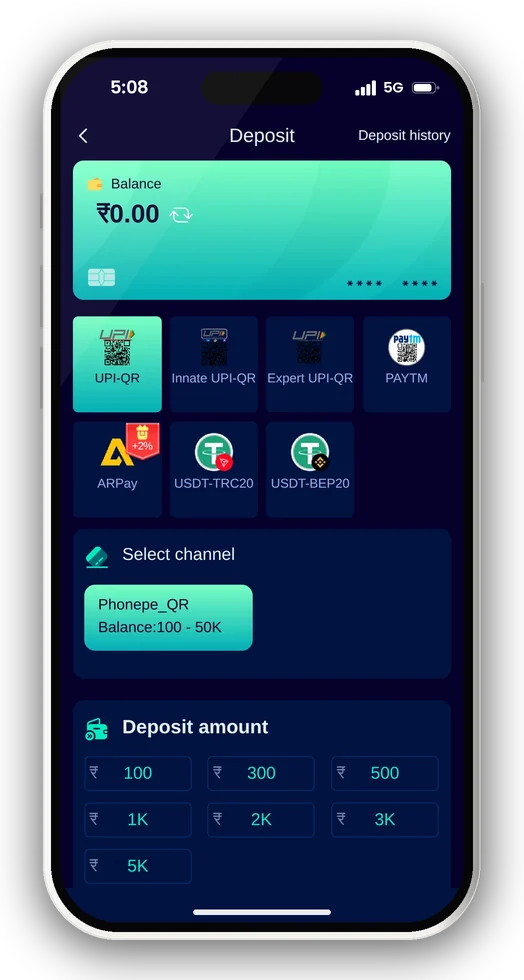
- Tap a quick amount (₹100, ₹300, ₹500, ₹1K, ₹2K, ₹3K or ₹5K) or type your own.
- Complete the payment on the page that opens before the timer runs out.
- Wait for the payment to confirm, and the balance is credited to your Wallet.
Paying With UPI
UPI is the method most Indian players pick because you can pay with any UPI app such as PhonePe, Google Pay or Paytm. It accepts ₹100 to ₹50,000 per deposit, so ₹100 is the smallest UPI top-up.
Once the payment is done, note down the UTR, which is the 12-digit reference shown in your UPI app’s transaction details. You only need it if the balance does not show up.
Paying With ARPay
ARPay connects to AR Wallet, a third-party payment service that uses a digital currency called ARB. A recharge to Jalwa through AR Pay is credited in about 5 seconds, and the ARPay option shows a +2% extra badge on the deposit page.
You can also sell ARB through UPI to get rupees back. The AR Wallet banner shows extra rewards for this, so check the current offer in the Activity tab.
Paying With USDT
USDT deposits suit players who already hold crypto. Choose USDT, select the TRC20 or BEP20 network, copy the deposit address shown and send only USDT on that network.
The minimum is 10 USDT, and a smaller transfer is not credited. After sending, paste the transaction or hash ID into the box so the deposit can be matched.
First Deposit Bonus
New members can claim the Member First Deposit Bonus, and regular players can build the Cumulative 10 Days Recharge Bonus. Offers change from time to time, so open the Activity tab to see the current details before you pay.
Deposit Rules That Decide If Money Is Credited
The deposit page lists a few strict rules. Most “paid but not credited” cases happen because one of them was broken.
- The amount must match. Pay exactly the order amount; a different amount cannot be credited, and wrong amounts are not the platform’s responsibility.
- Watch the timer. If the transfer time runs out, create a new deposit order instead of paying the old one.
- Do not cancel after paying. Cancelling the order once the money has left your account makes it hard to match.
- USDT only to the USDT address. Other coins or under 10 USDT will not be credited.
You can track each payment under Deposit history in the Account tab. Your Wallet page also shows total deposit and withdrawal amounts.
Before You Withdraw: The Betting Requirement
Each deposit comes with a betting requirement, also called turnover. This means you need to place bets worth a certain amount before that money can be withdrawn.
The Withdraw screen tells you to make sure your remaining total bet is already 0. If the number is above zero, the request will not go through until you finish it.
One more thing: if you played third-party games, part of your money may sit in the 3rd party wallet. Use “Main wallet transfer” on the Wallet page to move it back before withdrawing.
Jalwa Game Withdrawal Steps
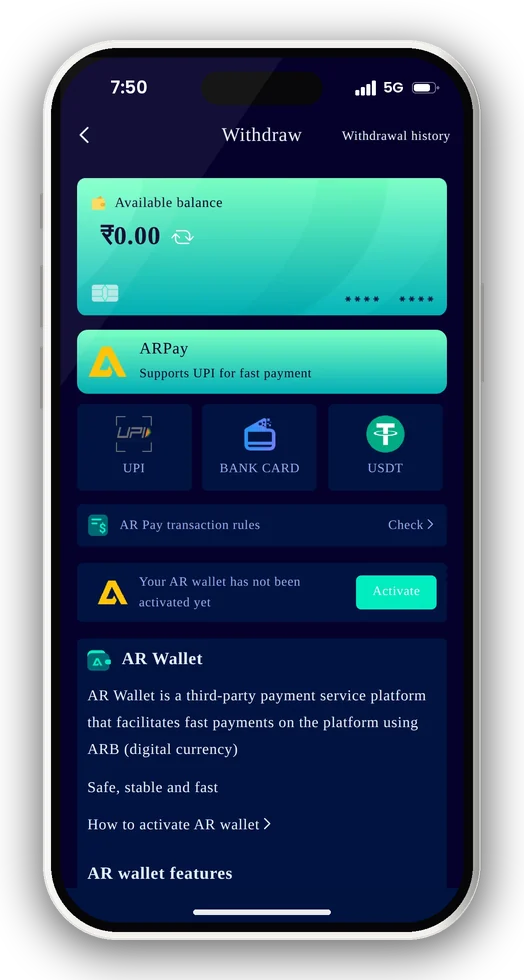
Withdrawals go to ARPay, UPI, a Bank Card or a USDT address. The first time, you add your payout details once, and after that each request takes only a few taps.
The Name Lock On Your First Payout Account
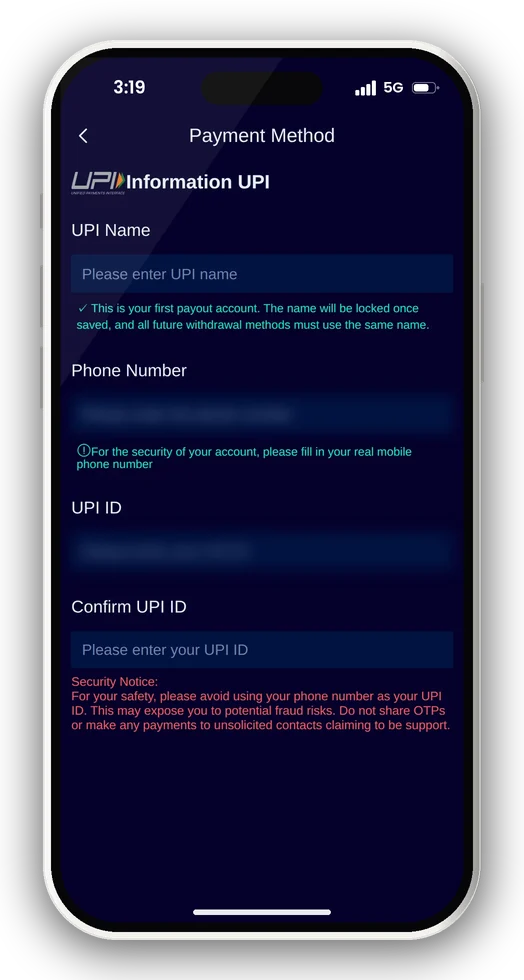
The name you save on your first payout account is locked. Every withdrawal method you add later must use the same name, so enter your real name exactly as your bank shows it.
Add A Bank Card
- Tap Wallet, then Withdraw, and choose Bank Card.
- Choose your bank from the list.
- Enter the full recipient name, account number, phone number, email and IFSC.
- Tap Save and check the details once more.
Add A UPI ID
Choose UPI and fill in the UPI name, a real phone number, your UPI ID and the UPI ID again to confirm. The app shows a security notice: avoid using your phone number as your UPI ID, and never share OTPs with anyone.
Add A USDT Address
Choose USDT, select the TRC network, paste your USDT address and give it an alias you will recognise. Paste the address rather than typing it, because one wrong character sends the funds to someone else’s wallet.
Request The Withdrawal
- Open Wallet and tap Withdraw.
- Check that the remaining betting requirement shows 0.
- Enter an amount within your method’s range (UPI ₹100–₹50,000, Bank Card ₹110–₹50,000, USDT ₹1,000–₹10,00,000).
- Choose your saved account.
- Enter your login password and confirm.
The request then appears under Withdraw history, where you can follow its status.
Have your account ready and make your first deposit in minutes.
Login NowJalwa Withdrawal Limits, Timings & Daily Count
Each withdrawal method has its own range, shown when you tap its icon on the Withdraw page. These are the limits in the Jalwa app right now.
| Method | Minimum | Maximum |
|---|---|---|
| UPI | ₹100 | ₹50,000 |
| Bank Card | ₹110 | ₹50,000 |
| USDT | ₹1,000 | ₹10,00,000 |
- Withdraw time: 00:00–23:59, so requests can be sent any time of day.
- Daily count: up to 3 withdrawals per day (“Inday Remaining Withdrawal Times”).
- USDT: the transfer needs 3 confirmations on the blockchain main network before it reaches your wallet.
- Betting first: the screen shows “Need to bet ₹… to be able to withdraw” — it must read ₹0.00.
Because you only get 3 withdrawals a day, it is smarter to take out one larger amount than several small ones. Double-check your bank details first — Jalwa is not responsible for losses from wrong bank information.
Jalwa Game Withdrawal Pending? Reasons And Fixes
A pending status does not mean the money is lost. In most cases one of the reasons below is behind it, and each has a simple fix.
Betting Requirement Not Completed
If the remaining bet amount is not 0, the withdrawal cannot be approved. Check the figure on the Withdraw screen and complete it first.
Account Details Do Not Match
A wrong IFSC, a missing digit, a mistyped UPI ID or a name that differs from your locked payout name can hold the payout. Compare your saved details with your banking app and correct any error.
Amount Below The Minimum
Requests under ₹100 (UPI), ₹110 (bank card) or ₹1,000 (USDT) will not go through. Raise the amount and try again.
Bank-Side Delay
Sometimes the payment has left but your bank has not shown it yet, especially at night, on weekends or on bank holidays. Give it some time, then check your bank statement before raising a ticket.
When To Contact Support
If none of the above applies, open Customer Service from the Account tab. Share your UID, the amount, the time of the request and a screenshot of the status, and read more on the customer care page.
Tips For Smooth Payments
- Use a bank account and UPI ID in your own name, matching your locked payout name.
- Save the UTR or hash ID for every deposit until it is credited.
- Jalwa customer service never sends links, so never pay to a UPI ID or link sent by a stranger on WhatsApp or Telegram.
- Move any 3rd party wallet balance back to the Main wallet before you withdraw.
- Set a budget for deposits and treat it as money for entertainment, not income. Real-money play is for 18+ only.
Deposit And Withdrawal FAQs
What is the minimum Jalwa Game withdrawal?
The minimum is ₹100 by UPI, ₹110 by bank card and ₹1,000 by USDT. The maximum is ₹50,000 per withdrawal for UPI and bank card and ₹10,00,000 for USDT.
What is the minimum deposit?
A UPI deposit starts at ₹100 and goes up to ₹50,000. For USDT, the minimum is 10 USDT.
My deposit is paid but not showing. What should I do?
Check that you paid the exact order amount before the timer ran out and did not cancel the order. Then send your UTR and payment screenshot to customer service.
Can I withdraw to UPI directly?
Yes, UPI is one of four withdrawal methods along with ARPay, Bank Card and USDT. Add your UPI ID once in the Withdraw section.
Can I change the name on my withdrawal account?
The name on your first payout account is locked once saved. All later methods must use the same name, so enter it carefully the first time.
Wrapping Up
Deposits work through UPI, USDT or ARPay, and withdrawals go to ARPay, UPI, a bank card or USDT. Pay the exact order amount, bring your betting requirement to 0, keep your payout name consistent and save every UTR.
Play only with money you can afford to spend, and take a break whenever the game stops being fun.