Jalwa Game customer care is available around the clock through the Customer Service chat inside the app. Whether a deposit has not shown up, a withdrawal is pending or you cannot log in, the support team on the Jalwa app is the right place to ask.
Below you will learn how to open support, what details to send for a quicker answer, which problems you can fix yourself and how to spot fake helplines. A few minutes of preparation usually saves hours of back-and-forth.
Quick Answer
- Support runs through the Customer Service chat in the app, around the clock
- Open it from the Account tab; referral questions go to Agent line customer service in the Promotion tab
- Send your UID, UTR or transaction ID and a screenshot with every request
- Jalwa customer service will never send links to members
- Numbers found on Google are not official support
How To Contact Jalwa Game Customer Care In The App
The official way to reach support is the chat built into the app. There is no need to search the internet for a phone number.
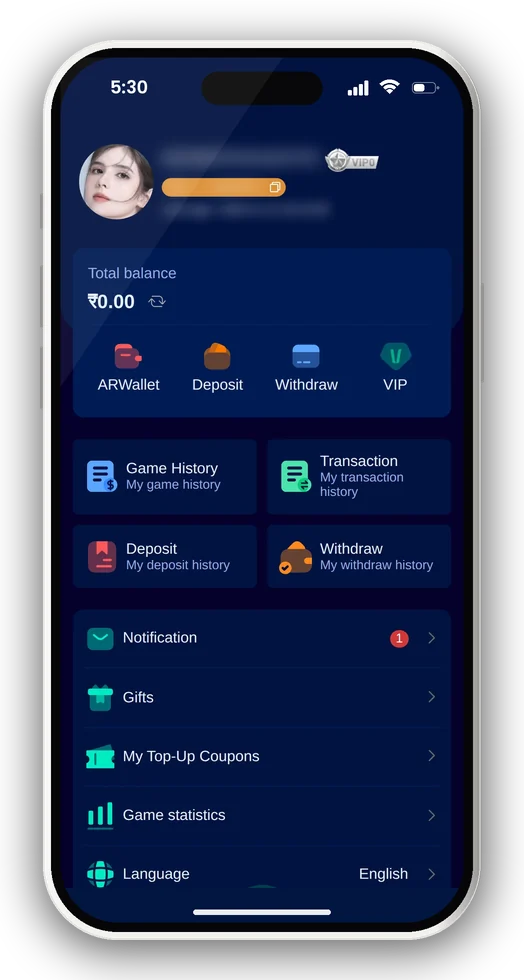
From The Account Tab
- Log in and tap Account in the bottom menu.
- Scroll down past Settings, Feedback and Announcement, and tap Customer Service.
- Pick the topic closest to your problem, or open the support chat.
- Describe the issue in one or two lines and attach your proof.
- Keep the chat open and reply when the agent asks a question.
When You Cannot Log In
If you are locked out because of a forgotten password, first try the self-service reset: tap Forgot password, enter your registered phone number and a new password twice, tap Send for the OTP, enter it, agree and tap Reset. If the OTP never arrives, the login page says to contact customer service.
Share the phone number or email you registered with, and follow the steps the agent gives you. The full sign-in steps are on the register and login page.
Referral And Commission Questions
The Promotion tab has its own Agent line customer service for questions about your team, subordinate data and commission. Use it for anything linked to your invitation link or invite code, and the normal Customer Service chat for everything else.
What To Send For A Faster Answer
Support can only check what you tell them. A clear message with the right details often gets solved in a single reply.
- Your UID, the account ID shown in the Account section
- The phone number or email linked to your account
- The UTR number for UPI deposits, or the transaction or hash ID for USDT
- The exact amount, the payment method and the date and time of the payment or request
- A screenshot of the payment receipt, your Deposit or Withdraw history, or the error on your screen
Where To Find Your UTR
Open your UPI app, go to the transaction history and tap the payment you made. The UTR is a 12-digit reference number shown in the payment details.
For USDT, copy the transaction hash from your crypto wallet.
How To Write Your Message
Keep it short and specific, for example: “UPI deposit of ₹500 made today at 8:15 pm, UTR and screenshot attached, balance not credited.” One clear message with proof works better than many short ones without details.
Fix These Yourself Before Opening A Chat
Several common problems have a fix inside the app. Trying these first can save you a wait.
- Change your password: Account → Settings → edit login password, as long as you remember the current one.
- Balance looks low: money used in third-party games can sit in the 3rd party wallet, so tap “Main wallet transfer” on the Wallet page.
- Withdrawal blocked: the Withdraw screen asks you to make sure your remaining total bet is 0.
- Deposit timer ran out: create a new deposit order instead of paying the old one.
- Not sure how something works: open Beginner’s Guide on the Account page for the platform’s own help notes.
For problems that are not urgent, such as an idea or a bug report, use the Feedback option on the Account page. Platform-wide news appears under Announcement and Notification.
Common Issues And How Support Helps
Most support requests fall into a handful of types. Match yours below to see what to send.
| Issue | What To Send | What Usually Helps |
|---|---|---|
| Deposit not credited | UID, UTR or hash ID, amount, screenshot | Check you paid the exact order amount, then send proof to support |
| Withdrawal pending | UID, amount, request time, status screenshot | Check remaining bet is 0, the minimum on the Withdraw screen and your account details |
| Forgot password | Registered phone number or email | Use the OTP reset first, then contact support if it fails |
| Account frozen | UID and registered phone number or email | Ask support for the reason and complete any check they request |
| Wrong payout details saved | UID and the correct account details | Ask support how to update the saved account |
| Gift code not working | The code and a screenshot of the error | Check spelling and expiry, then report it |
Deposit Not Credited
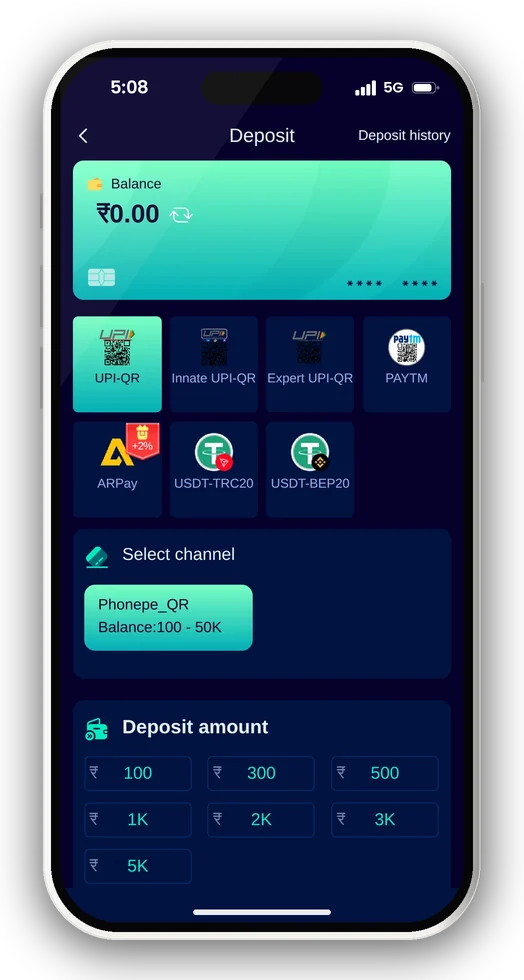
The deposit page is strict: the amount you transfer must match the order amount, and you should not cancel the order after paying. USDT deposits under 10 USDT are not credited at all.
If you followed the rules and the balance is still missing after a few minutes, send the UTR and a receipt screenshot so the team can match your payment.
Withdrawal Pending
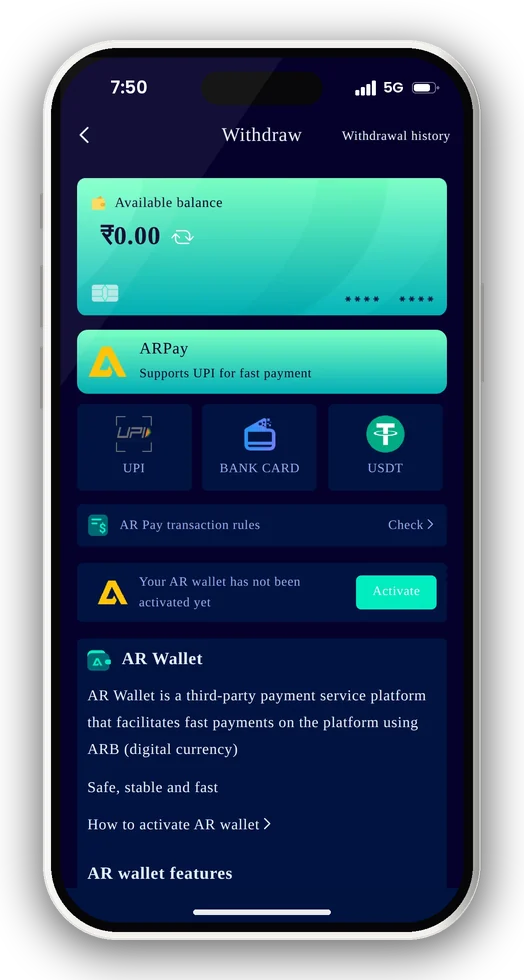
First check whether your remaining betting requirement is 0 and whether the amount meets the minimum for your method (₹100 UPI, ₹110 bank card, ₹1,000 USDT). The steps and common causes are covered on the deposit and withdrawal page.
If all of that is in order, send support your UID, the method (ARPay, UPI, Bank Card or USDT), the amount and the request time.
Account Frozen
Jalwa’s rules say that duplicate bonus claims from the same phone, email, bank or IP can be cancelled and the accounts frozen. If this happens, contact support, share your UID and registered number, and complete any verification they ask for.
Wrong Payout Details Saved
A single wrong digit in your account number, IFSC or UPI ID can stop a payout. Tell support your UID and the correct details, and ask how to update the saved account before you request another withdrawal.
Remember that the name on your first payout account is locked once saved. Every later withdrawal method must use the same name, so support cannot simply switch payouts to someone else.
Gift Code Not Working
Gift codes are entered under Gifts, from the Account page or the Activity tab, then you tap Receive. If a code fails, check the spelling, spaces and capital letters, and remember that codes can expire or run out.
Codes are given by your superior agent or posted on the Jalwa Telegram channel. More tips are on the Jalwa gift code page.
Log in and open Customer Service from the Account tab.
Login NowJalwa Game Telegram Channel
Jalwa Game shares updates and predictions on its Telegram channel: t.me/jalwagamepredictionsofficial. Join it to hear about new events, gift codes and announcements.
The channel is for news, not for private account problems. Never post your password, OTP or payment details in any group, and use the in-app chat for anything about your money.
Beware Of Fake Customer Care Numbers And Links
Jalwa’s official warning is simple: its customer service will never send links to members. Links from people claiming to be JALWA.GAME support can lead to your account being hacked, so always verify through the official website.
Searching “Jalwa customer care number” on Google also shows phone numbers posted by scammers. They pose as support to get access to your bank account or UPI app.
How The Scam Works
The fake agent sounds helpful and promises to fix a pending withdrawal quickly. Then they send a “login link”, ask for your UPI PIN, an OTP or a screen-sharing app, or ask you to “pay a small fee” to release your money.
How To Stay Safe
- Contact support only through the Customer Service chat inside the app.
- Never open a link sent by someone claiming to be Jalwa support.
- Never share your UPI PIN, OTP or password with anyone.
- Never install screen-sharing apps at a caller’s request.
- Never pay a fee to a personal UPI ID to release a withdrawal.
- If you already shared details, call your bank at once and report it at the cyber crime helpline 1930.
Tips To Get Your Issue Solved Quicker
Send everything in your first message: UID, amount, method, time, UTR and screenshot. Stay in the same chat instead of opening many new ones.
Keep screenshots of every deposit and withdrawal until they are complete. Jalwa only accepts players above 18, and setting a budget keeps small problems from becoming big ones.
Support FAQs
Is Jalwa Game customer care available 24/7?
Yes, the in-app Customer Service is available around the clock. Open it from the Account tab.
Does Jalwa Game have a customer care phone number?
Support works through the chat inside the app. Phone numbers found on Google or social media are not official, so do not call them.
Will Jalwa support ever send me a link?
No. Jalwa customer service never sends links to members, so any link from “support” should be ignored and reported.
What is a UID and why does support need it?
The UID is your account ID shown in the Account section. It lets support find your account quickly.
My deposit is not showing. What should I send?
Send your UID, the UTR or hash ID, the amount and a payment screenshot. Support uses these to match your payment.
Can I get help on Telegram?
The Telegram channel shares updates, predictions and gift codes. For account or payment issues, use the Customer Service chat in the app.
Need Help Right Now?
Help is always a few taps away through Account and Customer Service. Send clear proof, stay in the official chat and ignore any link or number that claims to be Jalwa support.
That way your issue reaches the real team, and your money and account stay protected.