Jalwa Game login takes less than a minute once your account exists, and creating that account is just as quick. All you need is an Indian mobile number or an email address, plus a password you will remember. Open the Jalwa Game website or the app, fill in a few fields and you are inside the lobby.
Below you will find the exact steps for signing up, logging in on Android, iPhone and desktop, resetting a forgotten password and fixing the sign-in problems players run into most. Every step matches the screens you see in the app.
Quick Answer
- Jalwa invite code: 4961211804045 (added automatically through the Register Now button)
- Register with a +91 phone number or an email address
- Password: at least 8 characters with upper-case letters, lower-case letters and numbers
- Log in with your phone number or email plus your password
- Forgot your password? Reset it with an OTP on your registered number, or contact customer service
What You Need Before You Sign Up
Registration does not ask for documents or bank details at the start. Keep these few things ready and the form takes about two minutes.
- A working Indian mobile number (+91) or an email address you can open
- A password of at least 8 characters that mixes upper-case letters, lower-case letters and numbers
- Your phone close by, because a password reset sends an OTP to your registered number
- A stable internet connection, either Wi-Fi or mobile data
Payout details only come in later, when you add a withdrawal account such as UPI, a bank card, ARPay or a USDT address. You can sign up, explore the games and look around the app without them.
How To Register On Jalwa Game Step By Step
There are two ways to open an account: with your phone number or with your email. The phone number route is the one most players in India use, so it comes first.
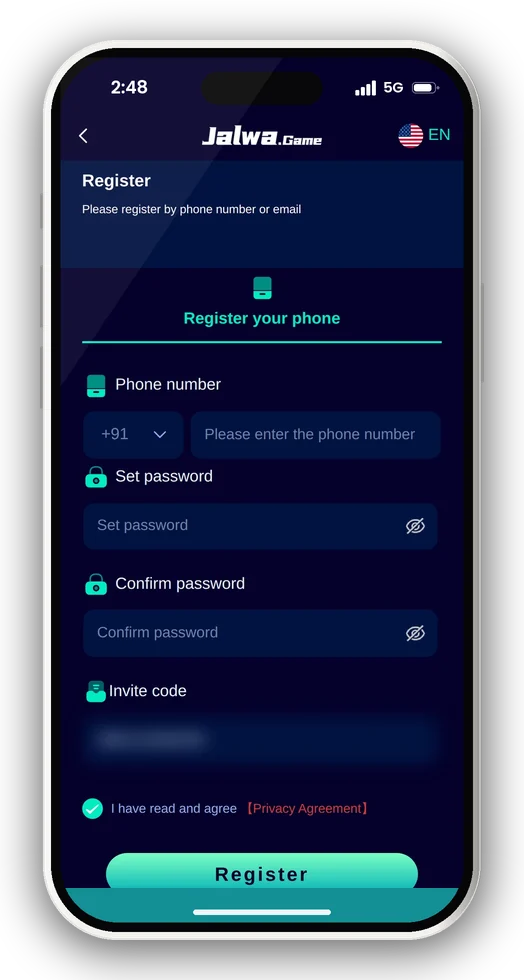
Register With Your Phone Number
- Tap the Register button on this site to open the official register page.
- Choose the phone number option and type your 10-digit mobile number after the +91 code.
- Fill in Set password, then type the same password again in the Confirm password box.
- Check the Invite code field, which is already filled when you arrive through the Register link. If it is empty, type 4961211804045.
- Tick the box that says “I have read and agree 【Privacy Agreement】”.
- Tap Register, and your new account is ready to use.
Register With Your Email Instead
Prefer not to use your number? Switch to the email option at the top of the form and enter an email address you check often. The rest of the fields stay the same: Set password, Confirm password, Invite code and the Privacy Agreement tick box.
Remember which method you chose. When you log in later, you must use the same phone number or email that you registered with.
Set A Password That Passes The Rules
Jalwa asks for a password of at least 8 characters that contains upper-case letters, lower-case letters and numbers. A password like “Rahul2025” meets the rule, while “rahul123” does not because it has no capital letter.
Avoid your phone number, birth date or name alone. Since this password is also asked for when you confirm a withdrawal, keep it strong and private.
Why The Invite Code Matters
The invite code links your new account to the referral that brought you in. When you open the form from the Register button here, code 4961211804045 is placed for you, so there is nothing to search for or type.
If the field ever shows empty, go back and open the register page again from the button. Do not copy random codes from unknown pages or comments.
Jalwa Game Login Steps For Every Device
Once your account is ready, signing in is the same on every device. The only difference is how you open Jalwa Game in the first place.
Login On The Android App
The Android app is not listed on Google Play, so it is installed from the official download page. If you have not installed it yet, follow the steps on the Jalwa app download page and allow “install unknown apps” when your phone asks.
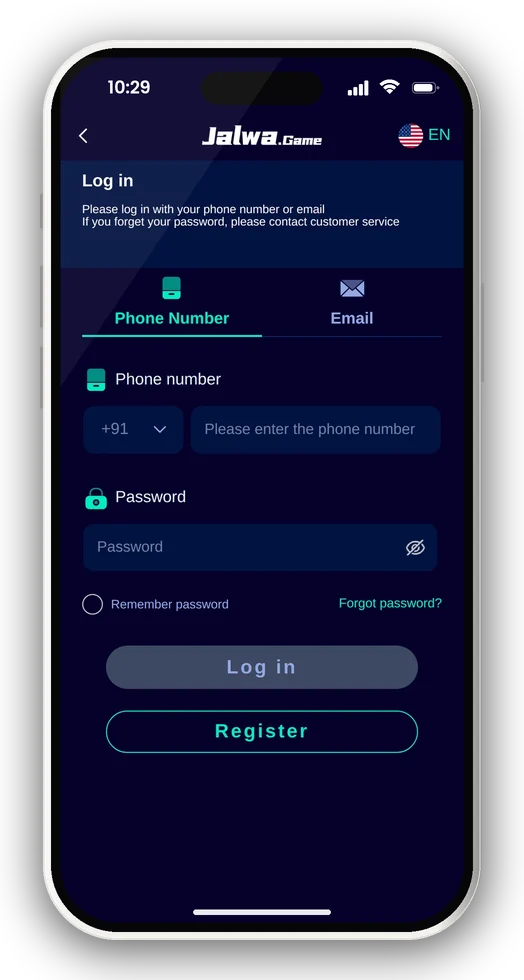
- Open the Jalwa Game app from your home screen.
- On the login screen, choose phone number or email, whichever you registered with.
- Type your number or email address and your password.
- Tick “Remember password” if this is your personal phone.
- Tap Log in to reach the home screen.
Login On iPhone
On an iPhone, open the site in Safari and tap the Share icon. Choose “Add to Home Screen”, and an app-style icon appears that opens Jalwa directly.
From there, enter your phone number or email and password exactly as on Android. Safari can also save your password if you allow it.
Login On A Laptop Or PC
Any desktop browser such as Chrome, Edge or Firefox works. Open the website, click Log in, pick phone or email and enter your password.
The site also offers an “Add to Desktop” option on the home screen. Use it to create a shortcut so you do not have to type the address every time.
New to Jalwa Game? Open your free account in about two minutes.
Register NowForgot Your Password? Here Is What To Do
There are two ways back into your account. You can reset the password yourself with an OTP sent to your registered phone number, or ask customer service for help, as the login page suggests.
Reset Your Password With An OTP
- Tap “Forgot password?” under the login fields.
- Enter the phone number you registered with.
- Type your new password, then type it again to confirm.
- Tap Send to receive the OTP by SMS, then enter it in the box.
- Tick the agreement box and tap Reset.
Log in with the new password straight away to make sure it works. The new password must follow the same rule: 8 or more characters with upper-case, lower-case and numbers.
Get Help From Customer Service
If the OTP does not reach you or you no longer use that number, the login page says to contact customer service. Share the phone number or email you registered with and follow the steps the support agent gives you.
For more on reaching support, what to send and how to avoid fake helplines, see the Jalwa Game customer care page.
Change Your Password While Logged In
If you still know your password but want a new one, there is no need for a reset. Go to Account, open Settings and edit the login password there.
Common Sign-In Problems And Quick Fixes
Most login errors come from small mistakes that take seconds to correct. Match your problem in the table and try the fix before contacting support.
| Problem | Likely Cause | What To Do |
|---|---|---|
| Wrong password message | Typing mistake, caps lock on, or an old password | Type slowly, check caps lock, then use Forgot password to reset by OTP |
| Password not accepted at sign-up | Fewer than 8 characters or no capital letter or number | Mix upper-case, lower-case and numbers in 8+ characters |
| Account not found | You registered with email but are typing a phone number, or the other way round | Switch to the method you used when signing up |
| Reset OTP not arriving | Network delay or a wrong number entered | Check the number, wait a minute and tap Send again |
| App stuck on loading | Weak internet or an outdated app | Switch between Wi-Fi and mobile data, or reinstall from the official download page |
| Logged out every time | Remember password not ticked, or app data cleared | Tick Remember password on your own phone |
| Login page asks for UPI PIN | You are on a fake copy of the site | Close it at once and use only the official link |
After You Log In: First Things To Do
Learn The Bottom Menu
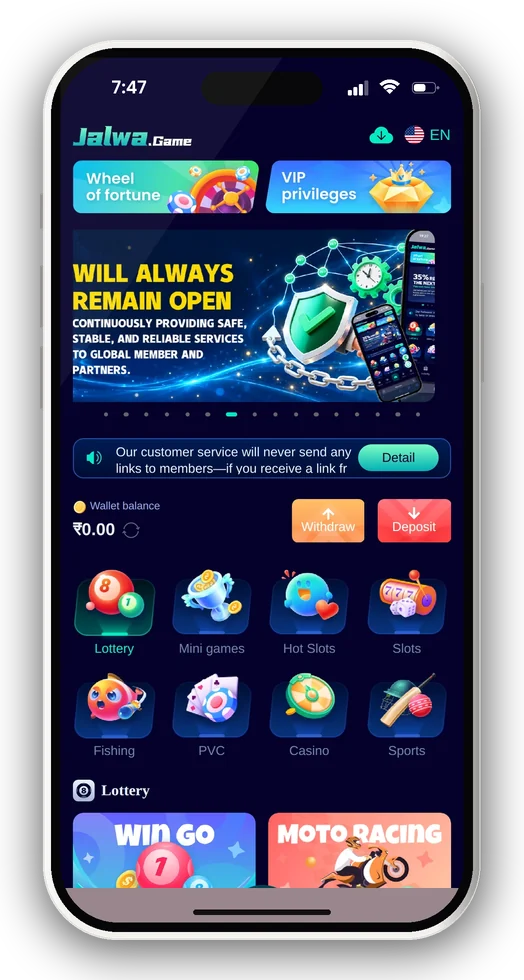
The bottom bar has five tabs: Promotion, Activity, Home in the centre, Wallet and Account. Home holds the game tabs (Lottery, Mini games, Hot Slots, Slots, Fishing, PVC, Casino and Sports), Activity lists bonuses and events, and Promotion is where your invitation link lives.
Wallet shows your balance with Deposit and Withdraw buttons. Account holds your settings, history and the Customer Service option.
Explore The Account Page
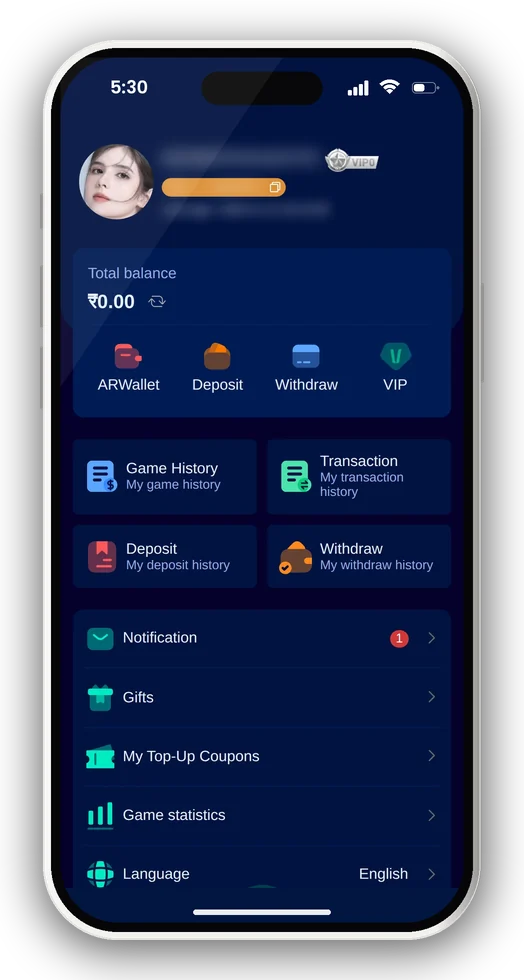
The Account tab is your control panel. It lists ARWallet, Deposit, Withdraw, VIP, Game History, Transaction, Deposit history, Withdraw history, Notification, Gifts and My Top-Up Coupons.
Further down you will find Game statistics, Language, Settings, Feedback, Announcement, Customer Service, Beginner’s Guide and About us. Open Beginner’s Guide once to see the platform’s own help notes.
Add Money To Your Wallet
Tap Wallet, then Deposit, and pick UPI, USDT or ARPay. UPI accepts ₹100 to ₹50,000 per deposit, and new members can check the Member First Deposit Bonus in the Activity tab before paying.
Collect Daily Rewards
Sign in every day to build your Attendance bonus, which grows with more consecutive days. The Gifts section also lets you enter a gift code and tap Receive for an extra reward.
Tips To Keep Your Account Safe
A few simple habits protect your balance and your personal details. Jalwa itself warns that its customer service will never send links to members, so treat any such message as a scam.
- Use a password you do not use on any other app or website.
- Never share your password, OTP or UPI PIN with anyone, even someone claiming to be support.
- Ignore links sent by people claiming to be JALWA.GAME support and verify through the official website instead.
- Install the app only from the official download page, never from random APK sites.
- Untick Remember password and log out when you use a shared phone or computer.
- Jalwa only accepts players above the age of 18, so set a budget and stick to it.
Jalwa Game Login FAQs
What is the Jalwa invite code?
The invite code is 4961211804045. It fills in by itself when you open the official Register link, so you only type it if the field is empty.
Can I log in with my email if I signed up with my phone number?
Use the same method you registered with. If you signed up with a phone number, log in with that number and your password.
What password does Jalwa accept?
At least 8 characters with upper-case letters, lower-case letters and numbers. Passwords without a capital letter or a number are rejected.
How do I reset my Jalwa Game password?
Tap Forgot password, enter your registered phone number and the new password twice, tap Send for the OTP, enter it, agree and tap Reset. If that fails, contact customer service.
Is the Jalwa app on Google Play?
No, the Android app is installed from the official download page. iPhone users add the site to the home screen through Safari.
Ready To Play?
Registering takes a phone number or email, a strong password and one tap on Register, and logging in is even faster after that. Keep your password private, ignore any links from “support” and use the OTP reset if you ever get locked out.
Play within a budget you are comfortable with, and enjoy the games at your own pace.